JollyDrivers Sign in

How it works

One booking. Two apps. One record behind both.

The Driver app runs the job on the road, the Rider app is the operator's own website on the rider's phone, and JollyDrivers keeps the record behind both, for drivers and operators in Queensland and New South Wales.

How it fits together

Two apps around one record.

Each app does one job for one person. Neither is a second system: what the driver swipes and what the rider books land on the same trip in JollyDrivers.

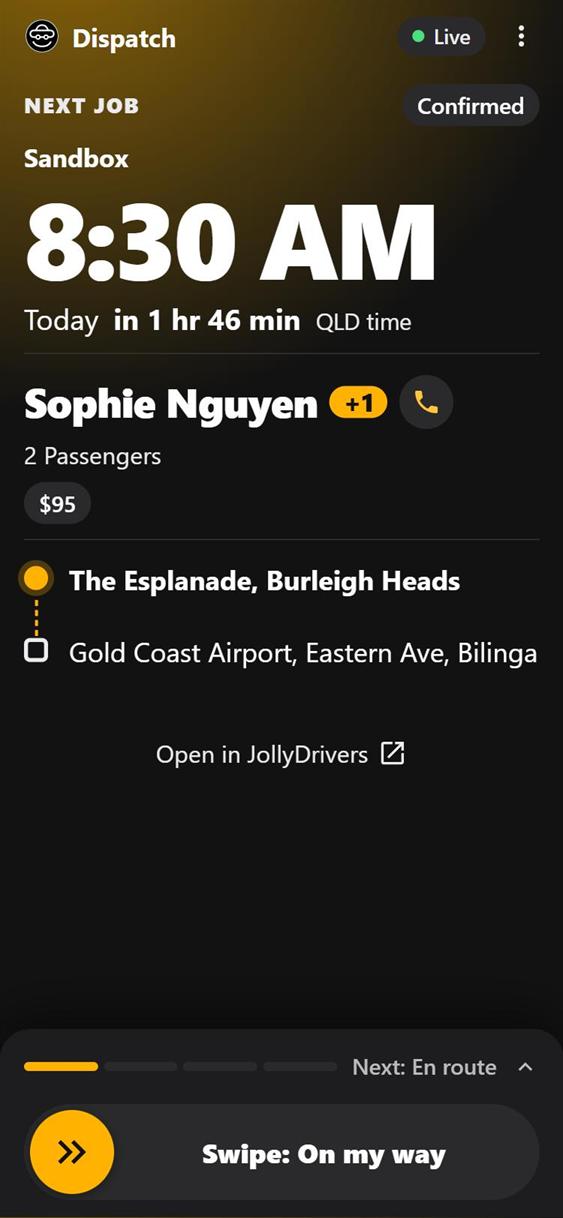
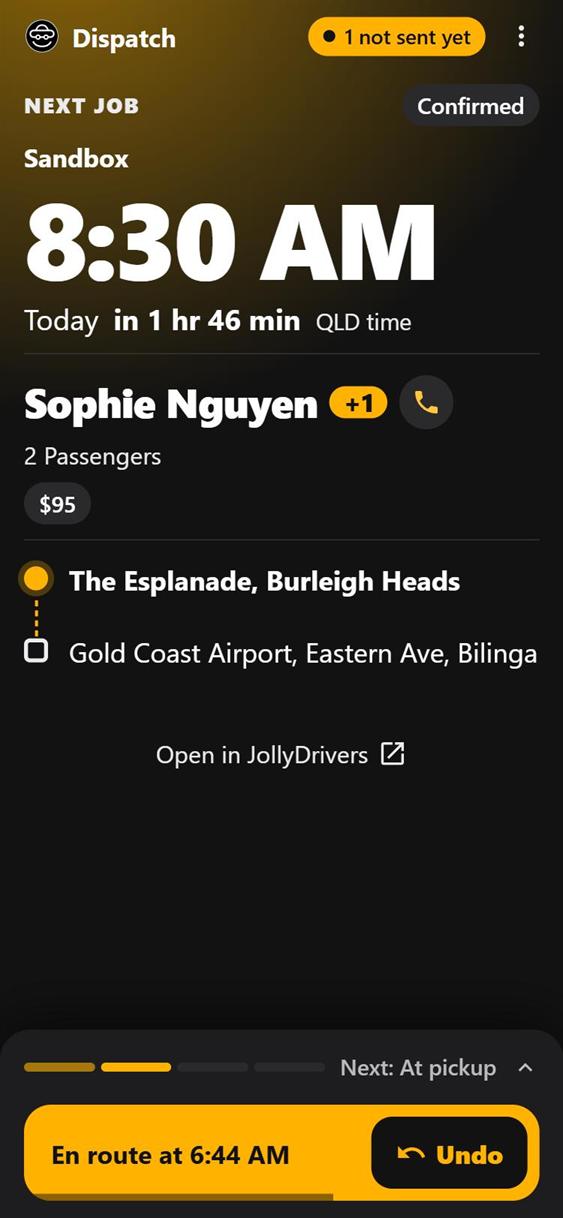
The Driver app: the next job at 8:30 AM today, two passengers from Burleigh Heads to Gold Coast Airport, with a swipe for On my way.
dispatch.jollydrivers.com.au

The Driver app: the job on the road

Directions, Call and Text, a swipe for each stage of the trip even with no signal, and the flight on an airport job. It keeps no records of its own: everything it does lands in JollyDrivers.

Being given out driver by driver during the beta.

See what it does
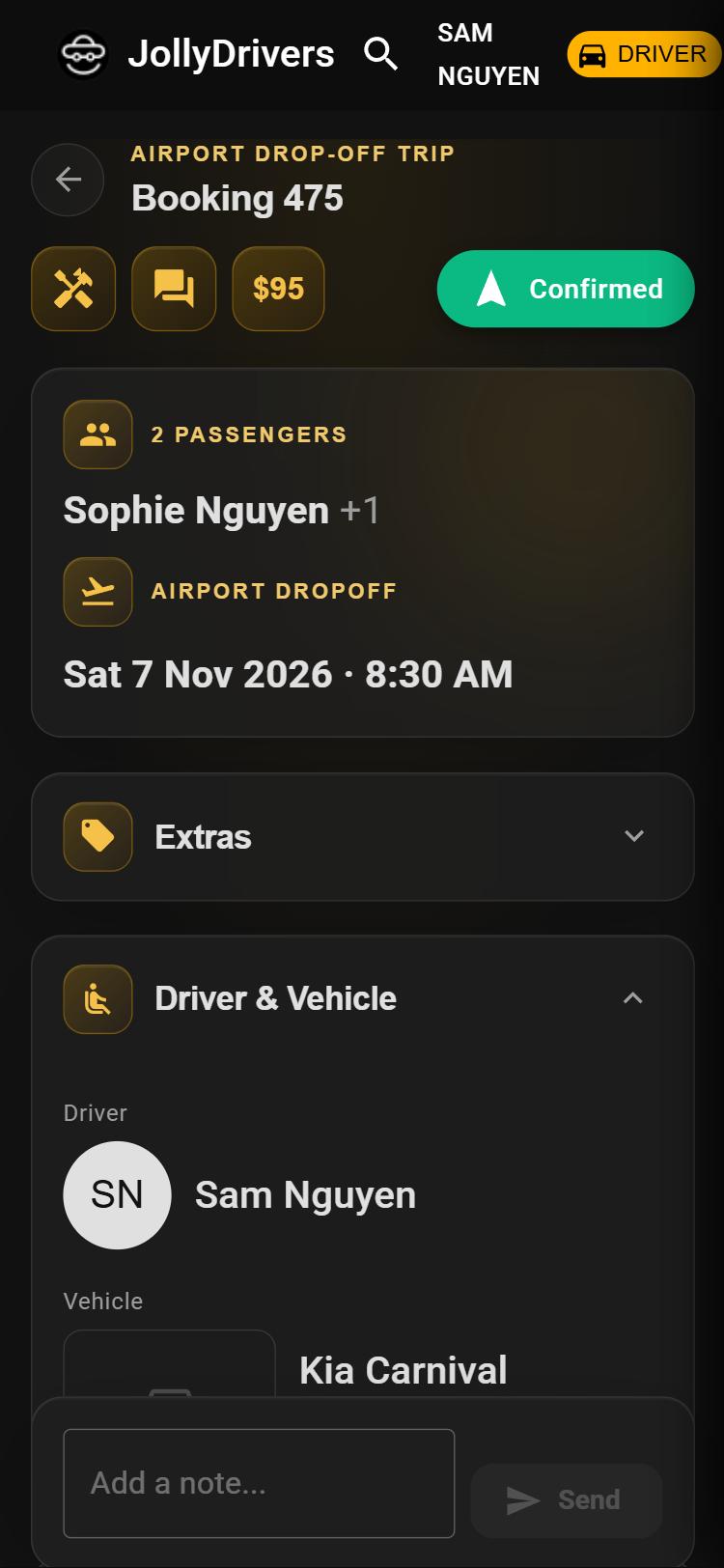
JollyDrivers: the same trip as an airport drop-off, confirmed, with its driver and car.
jollydrivers.com.au

JollyDrivers: the one record

Bookings, fares, compliance, and invoices in the operator's own Xero. Where drivers and operators work. However a booking arrives, it comes through one door, and every change is an event with a name on it.

About JollyDrivers
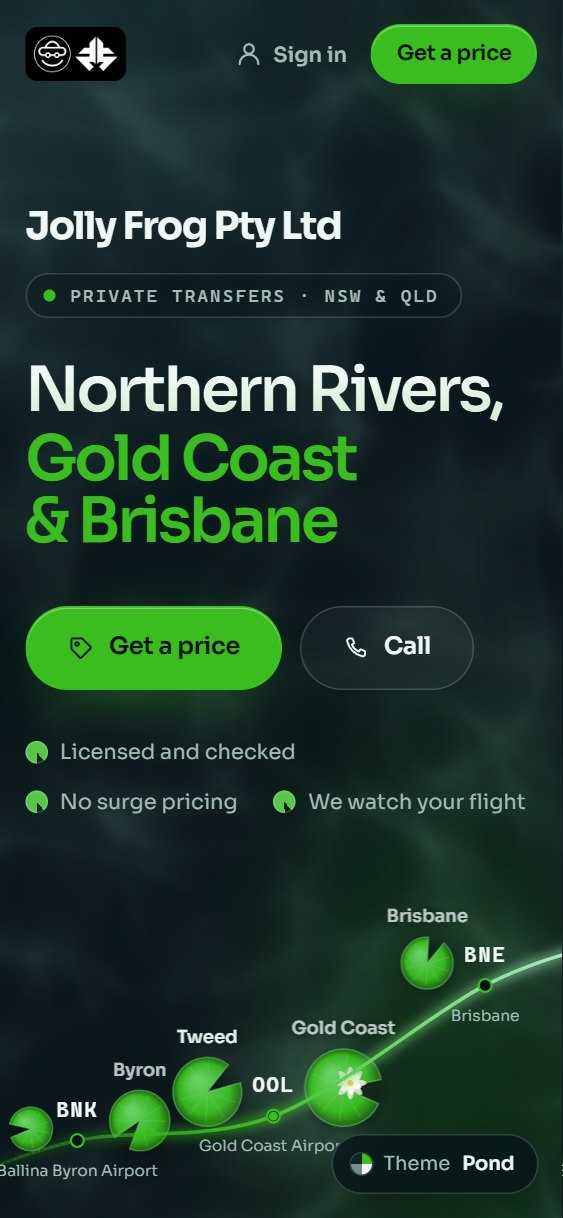
The Rider app on Jolly Frog's website: Northern Rivers, Gold Coast and Brisbane, with Get a price and Call.
the operator's own website, like jollyfrog.net.au

The Rider app: the operator's own, for riders

The operator's own website, which riders put on their phone, built and kept current by JollyDrivers: every driver's price, booking, the trip, following the car and paying. Riders never sign in to JollyDrivers itself.

See what it does
  • Every screen updates live
  • Addresses checked on Google Maps
  • Installs like an app
  • A booking assistant on Anthropic's Claude

One booking, through all three

From the rider's price to the record.

  1. Rider appBookedThe rider picks a driver's price on the operator's website and books it there.
  2. JollyDriversConfirmedIt reaches the operator as a request to confirm. Before a driver goes on the job, JollyDrivers checks that the driver and the car are cleared for the state the trip is in, warning or refusing as the operator has chosen.
  3. Driver appDrivenOn my way, I'm here, on board, completed: a swipe for each, landing on the trip with its time. A rider with trip updates on is told when the driver is on the way and at the pickup.
  4. Rider appPaidThe rider follows the car, then pays from their Trips screen, on a secure page for the operator. JollyDrivers records the payment, and the operator's invoices are raised in their own Xero.
  5. JollyDriversOn the recordEvery step is an event with a time and a name on it. The trip feeds the driver's hours, the operator's reports and the compliance record.
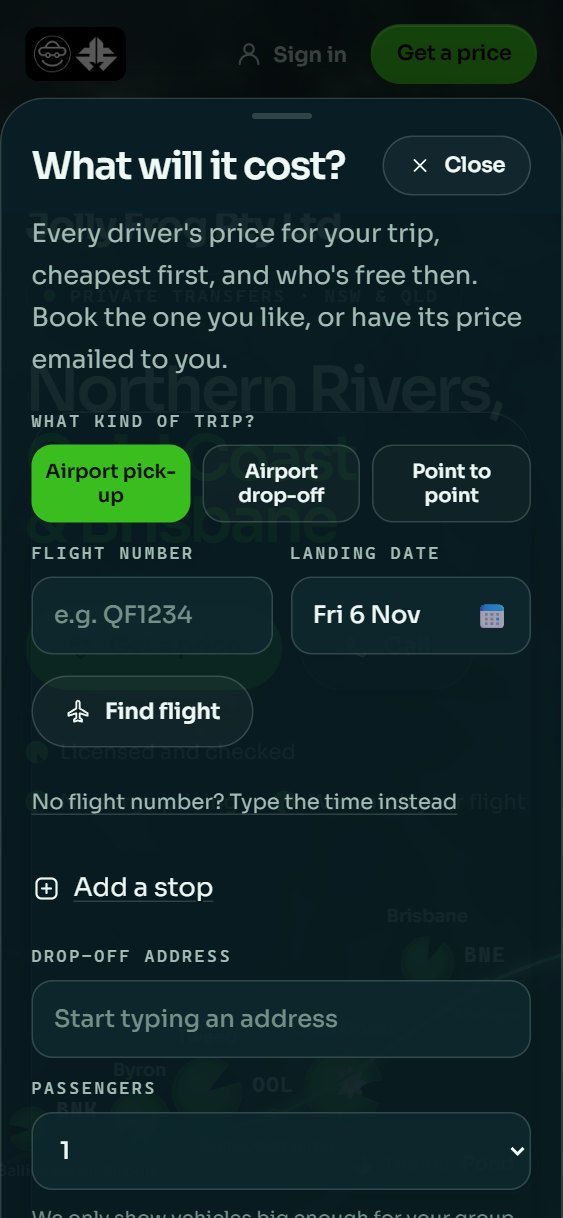
What will it cost? Every driver's price for your trip, cheapest first, and who's free then: the kind of trip, the flight number, Add a stop, the drop-off address and how many passengers.
Just after the On my way swipe: En route at 6:44 AM, with an Undo button.
The rider's prices on Jolly Frog's website, and a swipe in the Driver app.

From driver to operator

Start as a driver. Step up to operator when it suits you.

One account, from your first job to your own operator. Each stage is one you reach when it suits you, not a level you're pushed through.

01Drive

Drive under an operator

An operator who holds the authorisation, such as Jolly Frog, takes the bookings and stays accountable. You run the job.

  • Your own fare book for your own customers. Only you can see or change those prices.
  • No auto-dispatch. Pick up your own work, or your operator asks you. An offer shows the pickup, the drop-off, the time and, where it's set, the price before you say yes, and declining is the end of it: there is no acceptance rate.
  • No surge and no star ratings. Fares come from a fare book, never from demand, and the rating that counts is a rider booking you again.
  • Your documents in one place, shared with each operator you drive for only with your yes.

You use: your fare book · your documents · the Driver app · job offers

02Grow

Build your regulars under your own name

The customers you earn stay in your own book.

  • Your own customers, and quotes that hold your time until they answer.
  • One calendar across every operator you drive for, with a warning when two jobs clash.
  • Your hours counted from the trips themselves, across every operator, empty legs included.
  • Your share of every fare on your own earnings statements, under your operator's own commission.
  • Your own AI assistant on your account, if you want one. Connections are in a small pilot during the beta.

You use: your customers · quotes · one calendar · your hours · your earnings

03Step up

Run your own operator

In Queensland a booking entity needs a booking entity authorisation (BEA) from TMR, and a safety management plan. In New South Wales a booking service must be authorised (BSP) by the Point to Point Commissioner, and run a safety management system. The compliance guide sets out the rest.

  • JollyDrivers becomes your back office: your fare book, invoices in your own Xero, your compliance evidence and safety plan.
  • Your own Rider app: your website, built and kept current by JollyDrivers, which your riders put on their phone.
  • The drivers you take on start the same road under you.
  • Keep the same account. One JollyDrivers login can be both driver and operator, and you switch between them. Your documents, training and cars stay yours: you share them with your own operator as you would with any other. Your customers and your fare book stay with you, and your trips, earnings and hours stay in view, with your hours still counted across every operator, your own included.

You use: your fleet · your own Xero · your safety plan · your Rider app

One account at every stage. You don't move to a new system: during the beta, JollyDrivers opens the operator side of your account with you when you're ready.

Your AI

Bring your own AI. Talk to your bookings.

JollyDrivers speaks MCP, the open standard AI assistants use to plug into other software. Connect Claude, ChatGPT, Gemini or any assistant that supports it, and ask about your work the way you'd ask a colleague. No new app to learn: the assistant you already use becomes the way in.

Anyone, before they have an account

What is JollyDrivers, and how is it different from a rideshare app?

about_jd compare_to

It's booking and back-office software for small rideshare, chauffeur and transfer operators in Queensland and New South Wales, and their drivers. Where a rideshare app owns the rider and prices by demand, the operator sets their own fares with no surge, riders keep booking drivers they trust, and JollyDrivers works out no share of a fare for itself.

Drivers, signed in to their own account

What does tomorrow look like?

my_schedule

Three jobs across two operators: a 6:40 am airport pickup, an 11:00 run to the hospital, and a 3:30 pm return to the airport.

I'm at the terminal. Mark me arrived.

propose_trip_stage

Ready to record you as arrived for the 6:40 pickup. Go ahead?

Yes.

stamp_trip_stage

Done. You're marked as arrived.

Operators, signed in to their own account

What's still owed to us?

unpaid_invoices

Four invoices are unpaid; the oldest is 19 days. Want the list?

Later. Who's free for the 2 pm airport job?

fleet_status

Sam and Priya are both available from 1:30.

Accept it and put Sam on it.

propose_accept_booking propose_assign_driver

Here's what I'll do: accept the booking and assign Sam. Approve?

Illustrations. The names, times and amounts are made up; the tool names are the real ones.

  • It proposes. You approve.Anything that changes something, like accepting a job, stamping a stage or raising an invoice, comes back as a proposal to approve before it happens.
  • Your sign-in, your permissions.An assistant connects with your usual JollyDrivers login, in one role, and can do no more than you could in the app.
  • Recorded as you. Revocable by you.What it does is recorded as done by you, through your assistant. Disconnect it from your account and it stops on its very next call.
No accounthttps://jollydrivers.com.au/mcpRead-only. Its answers come from files that shipped with the release, plus JollyDrivers' own published contact address: it reads no bookings and no personal data.
Your accounthttps://jollydrivers.com.au/mcp/accountOperators and drivers, signing in as usual. It acts for one person, and some of its tools write. Open to a small pilot during the closed beta.

A plain-text summary for AI assistants is at /llms.txt.

Compliance

Written for Queensland and New South Wales.

JollyDrivers' compliance documents, safety-plan templates, courses and incident guidance follow those two states' point-to-point transport law, and it makes no claims about any other state or territory yet.

Drive, or run your own operator, on JollyDrivers.

JollyDrivers is in closed beta. Operators and drivers join by invitation, and some of what's here is switched on operator by operator, so each one starts with a conversation, not a form.

Pick your starting point